
谢豪
谢豪,理学博士,毕业于澳门科技大学,IEEE Member,现任东莞理工学院电信工程与智能化学院准聘副教授,同时为东莞市“战略科学家团队”成员。长期专注于无线通信和低功耗通信研究,方向涵盖智能反射面、流态天线、反向散射通信等等。参与国家自然科学基金、重庆市自然科学基金、澳门科技发展基金等多项科研项目,主持重庆市研究生科研创新项目1项。在国内外知名期刊和会议发表论文20余篇(其中SCI 14篇、EI 4篇、通信旗舰会议2篇)。相关成果发表于IEEE TWC、IEEE IoT-J、IEEE TII、IEEE TCOM、IEEE TVT、通信学报、电子与信息学报及 IEEE GLOBECOM、VTC 等会议。已受理与授权国家发明专利2项。曾任中国通信学会重庆邮电大学学生会员服务中心主任,荣获重庆邮电大学优秀硕士学位论文奖和重庆市优秀硕士学位论文奖,并被评为《电子与信息学报》年度优秀审稿人,现担任《电信科学》青年编委以及IEEE TWC、IEEE TCOM、IEEE TVT、IEEE IoT-J等期刊的审稿人。 欢迎通信、计算机及相关专业的校内外同学报考我的研究生。我们尤其欢迎数学与英语基础扎实的同学加入。有意者请通过邮件与我联系。
You can fork this template right now, modify the configuration and Markdown files, add your own PDFs and other content, and have your own site for free, with no ads!
A data-driven personal website
Like many other Jekyll-based GitHub Pages templates, Academic Pages makes you separate the website’s content from its form. The content & metadata of your website are in structured Markdown files, while various other files constitute the theme, specifying how to transform that content & metadata into HTML pages. You keep these various Markdown (.md), YAML (.yml), HTML, and CSS files in a public GitHub repository. Each time you commit and push an update to the repository, the GitHub pages service creates static HTML pages based on these files, which are hosted on GitHub’s servers free of charge.
Many of the features of dynamic content management systems (like Wordpress) can be achieved in this fashion, using a fraction of the computational resources and with far less vulnerability to hacking and DDoSing. You can also modify the theme to your heart’s content without touching the content of your site. If you get to a point where you’ve broken something in Jekyll/HTML/CSS beyond repair, your Markdown files describing your talks, publications, etc. are safe. You can rollback the changes or even delete the repository and start over - just be sure to save the Markdown files! You can also write scripts that process the structured data on the site, such as this one that analyzes metadata in pages about talks to display a map of every location you’ve given a talk.
For those users that need more advanced functionality, the template also supports the following popular tools:
Getting started
- Register a GitHub account if you don’t have one and confirm your e-mail (required!)
- Fork this template by clicking the “Use this template” button in the top right.
- Go to the repository’s settings (rightmost item in the tabs that start with “Code”, should be below “Unwatch”). Rename the repository “[your GitHub username].github.io”, which will also be your website’s URL.
- Set site-wide configuration and create content & metadata (see below – also see this set of diffs showing what files were changed to set up an example site for a user with the username “getorg-testacct”)
- Upload any files (like PDFs, .zip files, etc.) to the files/ directory. They will appear at https://[your GitHub username].github.io/files/example.pdf.
- Check status by going to the repository settings, in the “GitHub pages” section
Site-wide configuration
The main configuration file for the site is in the base directory in _config.yml, which defines the content in the sidebars and other site-wide features. You will need to replace the default variables with ones about yourself and your site’s github repository. The configuration file for the top menu is in _data/navigation.yml. For example, if you don’t have a portfolio or blog posts, you can remove those items from that navigation.yml file to remove them from the header.
Create content & metadata
For site content, there is one Markdown file for each type of content, which are stored in directories like _publications, _talks, _posts, _teaching, or _pages. For example, each talk is a Markdown file in the _talks directory. At the top of each Markdown file is structured data in YAML about the talk, which the theme will parse to do lots of cool stuff. The same structured data about a talk is used to generate the list of talks on the Talks page, each individual page for specific talks, the talks section for the CV page, and the map of places you’ve given a talk (if you run this python file or Jupyter notebook, which creates the HTML for the map based on the contents of the _talks directory).
Markdown generator
The repository includes a set of Jupyter notebooks that converts a CSV containing structured data about talks or presentations into individual Markdown files that will be properly formatted for the Academic Pages template. The sample CSVs in that directory are the ones I used to create my own personal website at stuartgeiger.com. My usual workflow is that I keep a spreadsheet of my publications and talks, then run the code in these notebooks to generate the Markdown files, then commit and push them to the GitHub repository.
How to edit your site’s GitHub repository
Many people use a git client to create files on their local computer and then push them to GitHub’s servers. If you are not familiar with git, you can directly edit these configuration and Markdown files directly in the github.com interface. Navigate to a file (like this one and click the pencil icon in the top right of the content preview (to the right of the “Raw | Blame | History” buttons). You can delete a file by clicking the trashcan icon to the right of the pencil icon. You can also create new files or upload files by navigating to a directory and clicking the “Create new file” or “Upload files” buttons.
Example: editing a Markdown file for a talk 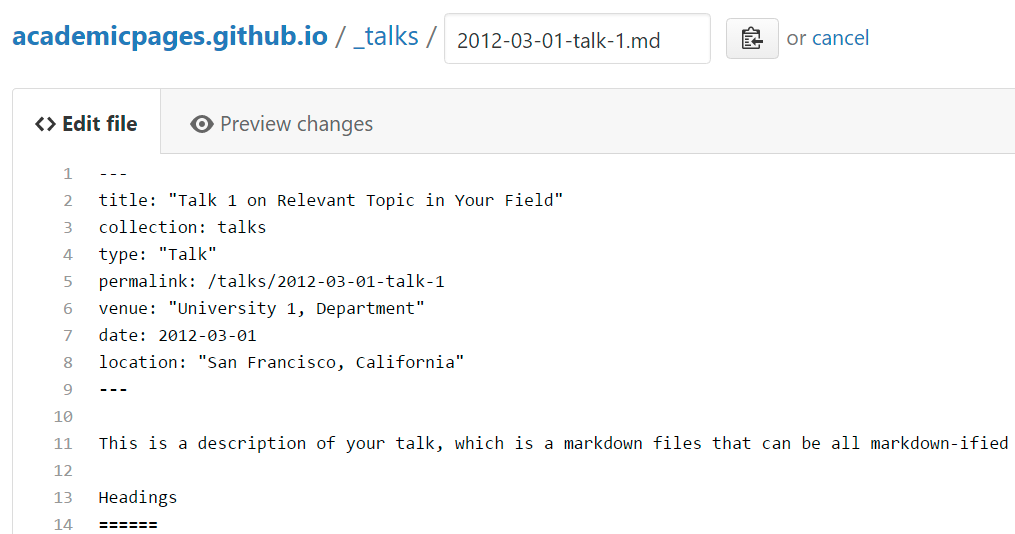
For more info
More info about configuring Academic Pages can be found in the guide, the growing wiki, and you can always ask a question on GitHub. The guides for the Minimal Mistakes theme (which this theme was forked from) might also be helpful.